 Evgenii Zhuravlev - DevOps Engineer
Certbot on two servers with Round-Robin DNS
Confirming the ssl certificate for a website that runs on several different servers
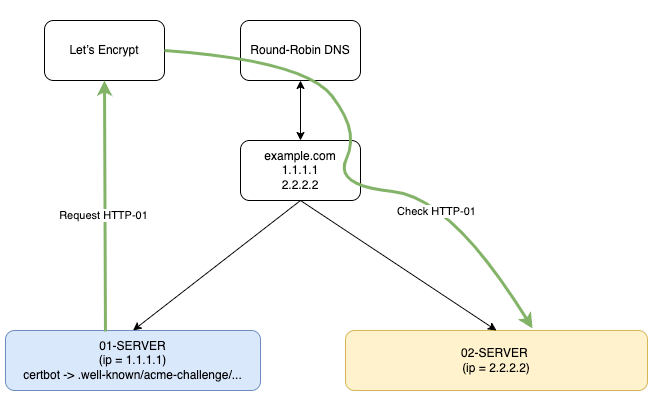
You may need to run ACME HTTP-01 to verify the Certbot certificate. The nuance is that you cannot perform DNS-01, because, for example, the zone does not belong to you, you only serve the site, but at the same time this site is located on several servers. At the same time, his address is resolved by Roud-Robin DNS, for example, like this:
nslookup example.com
1.1.1.1
2.2.2.2
This is a possible case, I’ve come across it myself a long time ago, but it definitely exists. I would also add that in this case it would be good to have a Load Balancer in front of the servers, but an attentive reader will say that this will not fix the situation without special configuration of the Load Balancer, let’s figure it out.
Recall how HTTP-01 validation works in ACME (Let’s Encrypt) via Certbot
HTTP-01 is a domain ownership verification method in which Let’s Encrypt checks for a special file in the web root (.well-known/acme-challenge).
Certificate Request
Run Certbot with the command, for example:
certbot certonly --webroot -w /var/www/html -d example.com
Certbot creates a temporary file in the directory
/var/www/html/.well-known/acme-challenge/
Request from Let’s Encrypt
The Let’s Encrypt server accesses your site via HTTP:
http://example.com/.well-known/acme-challenge /
Certificate issuance
If everything was successful:
✅ Let’s Encrypt confirms the domain.
✅ The certificate is issued and stored in /etc/letsencrypt/live/example.com/
✅ If auto-tuning is used (certbot –nginx or certbot –apache), the configs are updated automatically.
What happens if there are several servers?
Certbot will create a temporary file on one server, and the Let’s Encrypt authentication server can use the Roud-Robin DNS to get the address of another, and when it performs verification, it will not find this file on it. After all, it wasn’t created there, that’s right! How can this be avoided? Below is the solution that allows you to update/obtain the certificate correctly:
Cron on 01-SERVER
Add on the 01-SERVER (ip = 1.1.1.1), the certbot update is performed on the first server and is NOT performed on the second (so that the key directories merge correctly):
cat /etc/cron.d/certbot
0 */12 * * * root python -c 'import random; import time; time.sleep(random.random() * 3600)' && certbot -q renew --allow-subset-of-names --renew-hook "systemctl reload nginx"
and
cat /etc/letsencrypt/renewal/SITE.conf
....
[renewalparams]

#custom:
autorenew = False
Trigger the changes (these are the rules recorded in incrontab):
incrontab -l
/etc/letsencrypt/archive/www.SITE.com-0001/ IN_MODIFY,IN_CREATE,IN_DELETE,IN_CLOSE_WRITE /usr/local/bin/rsync_using_incron_for_certbot.sh
According to the changes, we overwrite the certificate and links to it on the second server and if everything is correct, restart nginx, if not correct, issue an alert to monitoring:
cat /usr/local/bin/rsync_using_incron_for_certbot.sh

#!/bin/bash

# VARs:
RESULT_READ_SYMLINC_FULLCHAIN=$(readlink -f /etc/nginx/ssl/SITE.ru-443-l2.crt | grep -o fullchain[[:alnum:]].pem)
RESULT_FOR_PUSH_IN_FULLCHAIN=(/etc/letsencrypt/archive/www.SITE.ru/$RESULT_READ_SYMLINC_FULLCHAIN)
RESULT_READ_SYMLINC_PRIVKEY=$(readlink -f /etc/nginx/ssl/SITE.ru-443-l2.key | grep -o privkey[[:alnum:]].pem)
RESULT_FOR_PUSH_IN_PRIVKEY=(/etc/letsencrypt/archive/www.SITE.ru/$RESULT_READ_SYMLINC_PRIVKEY)

# Start:
sleep 15m
rsync -avx --numeric-ids --delete --progress /etc/letsencrypt/archive/www.SITE.ru-0001/ -e ssh root@2.2.2.2:/etc/letsencrypt/archive/www.SITE.ru/
ssh root@2.2.2.2 rm -f /etc/letsencrypt/live/www.SITE.ru/fullchain.pem
ssh root@2.2.2.2 ln -s $RESULT_FOR_PUSH_IN_FULLCHAIN /etc/letsencrypt/live/www.SITE.ru/fullchain.pem
ssh root@2.2.2.2 rm -f /etc/letsencrypt/live/www.SITE.ru/privkey.pem
ssh root@2.2.2.2 ln -s $RESULT_FOR_PUSH_IN_PRIVKEY /etc/letsencrypt/live/www.SITE.ru/privkey.pem
ssh root@2.2.2.2 nginx -t | grep "test is successful"

# Monitoring
if let "$?==0"
then
ssh root@2.2.2.2 nginx -s reload
**### MONITORING ALERT:**
/usr/local/bin/alert_telegraf_for_certbot.py 0
else
/usr/local/bin/alert_telegraf_for_certbot.py 1
fi
🔴 Common mistakes and their solutions
🔴 403 Forbidden Make sure that the web server allows access to .well-known/acme-challenge/
ls -l /var/www/html/.well-known/acme-challenge/
Если используешь Nginx, добавь в конфиг:
location /.well-known/acme-challenge/ {
    root /var/www/html;
}
🔴 404 Not Found Make sure that Certbot creates the file in the correct folder.
sudo certbot certonly --webroot -w /var/www/html -d example.com
Make sure that you have DocumentRoot (Apache) or root (Nginx) configured correctly.
🔴 Port 80 is unavailable It is important to remember that the Let’s Encrypt authentication server cannot reach the server on port 443, because the certificate has not yet been issued, and it arrives on port 80.